About this map
Live weather radar for Indonesia
Every circle on the map is a single BMKG radar station. The coloured blob inside it is the echo that station measured on its last scan — the more energy the raindrops sent back, the brighter the colour. Overlay the circles and you get a live picture of where it is raining across the archipelago.
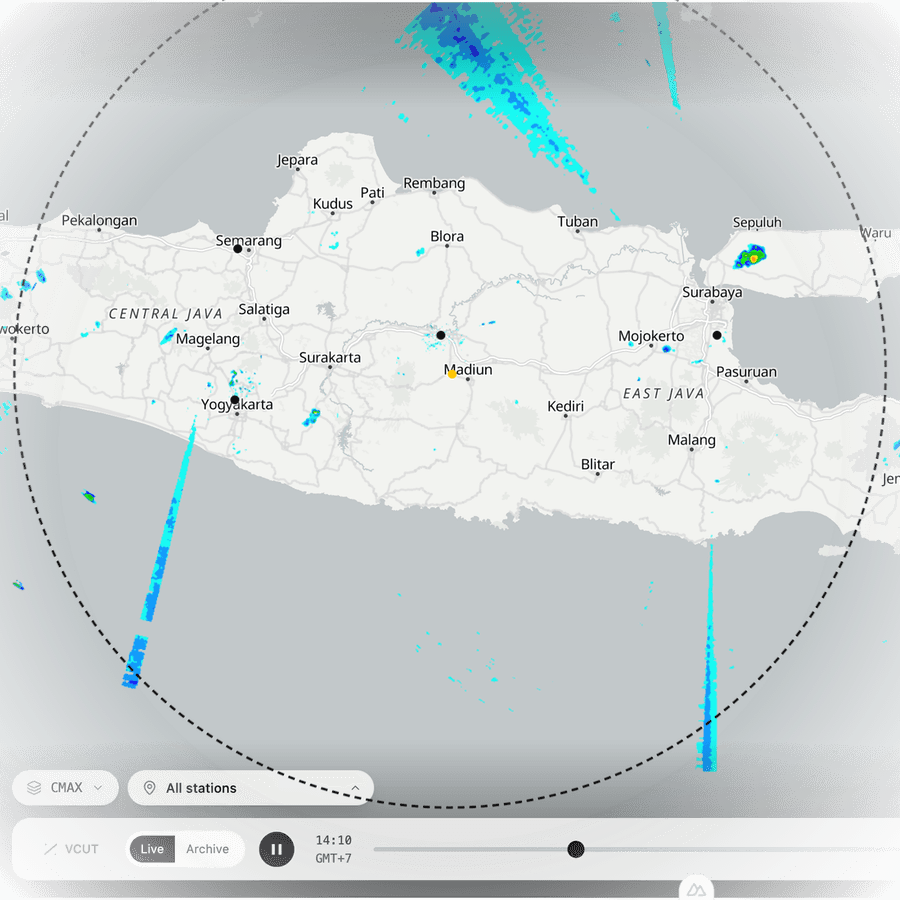
What one station looks like
Each circle is a single radar. The dashed ring marks the edge of its coverage — about 240 km from the mast at the centre. Everything inside that ring is what this one station could see on its last sweep; everything outside it, it could not.
The colour is how hard the rain is coming back. Pale blue is barely anything. Green is a proper shower. Yellow and orange mean it is pouring, and a dark red core is a storm cell. No colour at all simply means no rain was detected here.
Because no radar can see past its own ring, neighbouring stations overlap to close the gaps. Near the edges of the network, where coverage runs out, there are places this map genuinely cannot tell you about.
How each frame is found
Nothing is drawn from guesswork. Every pixel on screen comes from a file the upstream service already published.
- 1
A radar scans the sky
BMKG runs 46 radar sites nationwide, each sweeping a rotating beam every 5–10 minutes. C-band radars reach 150–250 km; X-band radars are shorter but see smaller droplets better.
- 2
Doppler shift becomes colour
The frequency shift of the returning echo gives the size and speed of the raindrops. Reflectivity (dBZ) is the standard measure of that energy, and the agency paints it into the colour scale you see here.
- 3
SI-DARMA gathers the sites
BMKG’s SI-DARMA system pulls every site’s volume scans into one archive, turns them into products (reflectivity, rain rate, accumulations, nowcasts) and republishes them as PNG.
- 4
This page fetches the PNG
Each frame is a 4084×4084 image covering roughly 500 km across. The app asks for the product and time it needs, then places the image over that station’s position.
Reading the colours
The scale runs from 5 to 75 dBZ. The higher the value, the heavier the rain. These are the official BMKG intensity classes, shown with the exact colours used on the map.
Hover any colour on the legend in the bottom-right corner for its class.
| Rain | dBZ | mm/h |
|---|---|---|
Very light | 0–20 dBZ | < 1 mm/h |
Light | 20–35 dBZ | 1–5 mm/h |
Moderate | 35–45 dBZ | 5–10 mm/h |
Heavy | 45–55 dBZ | 10–20 mm/h |
Very heavy | > 55 dBZ | > 20 mm/h |
The products
The same radar data can be presented in different ways. Pick one from the Product menu at the bottom of the map. The current one is highlighted below.
Reflectivity (dBZ)
Reflectivity — how much energy the rain echoes back
- CMAXMaximum reflectivity (dBZ) found in the column above each point. The higher the dBZ, the heavier the rain.
- CMAXHWINDCMAX overlaid with HWIND: wind direction and speed (wind barbs), taken from radial velocity data.
- CMAXSSACMAX overlaid with SSA (Storm Structure Analysis): the location and structure of thunderstorms. It does not predict how they will move or develop.
Altitude slices (CAPPI)
Altitude slices — the same echo at one fixed height
- CAPPI005Reflectivity (dBZ) on a plane at a constant altitude of 0.5 km.
- CAPPI005HWINDReflectivity at 0.5 km altitude overlaid with HWIND: wind direction and speed (wind barbs) at that altitude.
- CAPPI010Reflectivity (dBZ) on a plane at a constant altitude of 1.0 km.
- CAPPI010HWINDReflectivity at 1.0 km altitude overlaid with HWIND: wind direction and speed (wind barbs) at that altitude.
Rainfall
Rainfall — how much water is actually falling
- SRIEstimated rain intensity (mm/h) at the surface.
- PAC01HEstimated accumulated rainfall (mm) over the past 1 hour.
- PAC06HEstimated accumulated rainfall (mm) over the past 6 hours.
- PAC12HEstimated accumulated rainfall (mm) over the past 12 hours.
- PAC24HEstimated accumulated rainfall (mm) over the past 24 hours.
Forecast
Forecast — where the rain is heading
- STEPSShort-term prediction (nowcasting) of reflectivity 1 to 3 hours ahead, from the Short-Term Ensemble Prediction System (ensemble-max). Times shown are forecast times.
- QPFQuantitative Precipitation Forecast: the rainfall accumulation (mm) predicted by STEPS. This is a prediction, not an observation.
Using the map
Play the last hour
The scrubber runs the previous hour frame by frame. Stations scan on their own schedules, so each one is matched to the closest observation in time.
Go back further
Switch to Archive and pick a date and a window. The archive covers the last 48 hours, so yesterday’s rain is still there.
Slicing the atmosphere
Turn on VCUT, then tap two points. You get a vertical cross-section of the storm between them — height against reflectivity.
Rain at a point
Alt-click any spot on the map to see that exact location’s reflectivity through the day, for the selected station.
Radar imagery and product descriptions are the work of BMKG and its SI-DARMA radar integration system. Basemap tiles are OpenFreeMap with data from OpenStreetMap contributors.